


Short answer: On 15 October 2026 Google announced it is adding more links to AI Mode and AI Overviews answers and placing them higher, and it is testing a new section that groups links to official sites at the top of an answer. For Thai businesses, this is a reason to make the official website say clearly who you are, what you do and where you are, with details that match your Google Business Profile. Daaistudio sets out what changed and what to do below.
What changed
In a post on Google's The Keyword blog on 15 October 2026, Google described five changes:
- More inline links: AI Mode and AI Overviews answers get more links inside the text, shown higher in the answer more often.
- An official-sites section (in testing): links to official sites in their own section at the top of an answer, with context on why each link is useful.
- News carousels: expanding to more locations and languages, highlighting the user's Preferred Sources.
- Related-article links: links at the end of some answers get image thumbnails and an easier-to-click design.
- Creator links: creator names on video results in AI Mode link to their profiles (testing began the week of the announcement).
Google did not list countries for each change, and the official-sites section is a test with no launch date, so we cannot yet confirm every change is live in Thailand.
What it means for Thai businesses
- The official website matters in AI answers: if Google points people to official sites, a business with no website, or a site that does not say clearly whose it is, risks being skipped in favour of a platform or a competitor.
- Details must match everywhere: business name, address, phone and website link should be the same on the site and in Google Business Profile, so Google can be confident which site is yours.
- No special code needed: Google's documentation says there are no additional requirements to appear in AI Overviews or AI Mode. SEO basics still apply: Google can reach the site, pages are indexed, and key information is real text, not images.
- AI clicks are not shown separately: Search Console counts AI Overviews and AI Mode clicks in the Web search type, together with regular results.
How we are adapting client work
This news does not start new work for us, but it puts more weight on work we already do. What we really do for SEO GEO clients:
- A homepage that says who you are: we write the business name, main services, service area and contact options as real text on the page, and open each page with a short answer AI can quote.
- Schema that matches the page: we add Organization or LocalBusiness data only from details the client has confirmed, and nothing that is not visible on the page.
- Business Profile care alongside the site: every month we check that the name, address, opening hours and website link in the Business Profile match the site.
- Monthly AI question tests: we ask Google and AI the questions our clients' customers are likely to ask, and keep screenshots in the report, because Search Console cannot separate AI clicks.
- The client owns the accounts: Search Console and Business Profile stay in the client's business name; we get access to work.
An example from our clients: for the search gong bath bangkok, Google's AI Overview names Pree Energy & Sound, a sound healing studio in Bangkok, with the studio's address. This is the kind of business information the new link sections rely on.
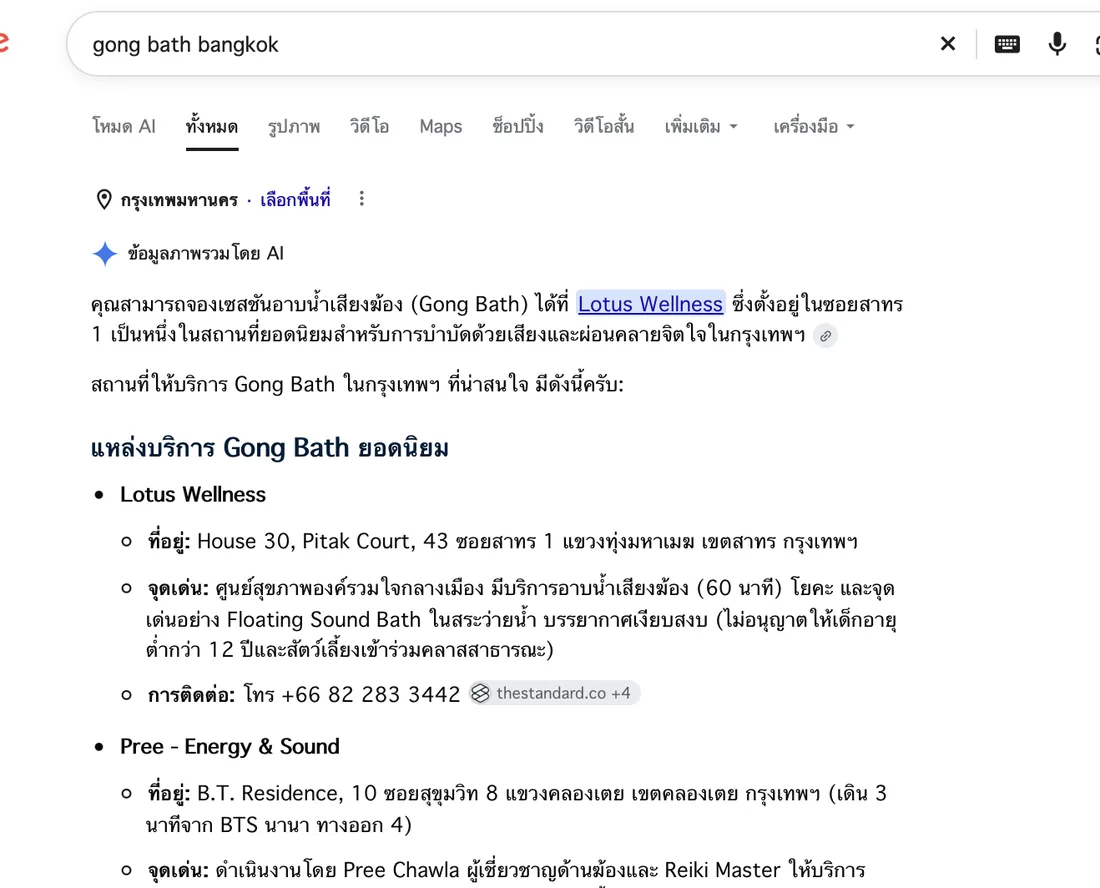
Google's AI Overview names Pree Energy & Sound with its address for gong bath bangkok (screenshot taken 3 October 2026). Results vary by location and time.
We hold a 5.0 rating on both Google and Fastwork, with 18 jobs on Fastwork and 8 clients who hired us again. The restaurants Al Saray and Brasserie 9 renewed their SEO GEO care for 6 months after the first 3.
What to do now: a short checklist
- Search your business name and main service on Google and see whether the AI answer links to your site or somewhere else.
- Check that your homepage states the business name, services, area and contact options as real text, not only inside images.
- Compare name, address, phone and website link between your site and Google Business Profile, and make them match.
- Test your schema with the Rich Results Test and check it matches the page.
- Check that your firewall or CDN does not block Googlebot.
- Review the Web search type in Search Console each month, and keep screenshots of AI answers to compare.
Want to know what AI answers say about your business?
Send us your site. In the free analysis plan we test questions on Google and AI and check your site against your Business Profile, then tell you what to fix first.
No one can guarantee Google rankings or AI answers. We show only results that really happened and can be measured.