



Short answer: Elementor 4.4, still in beta, adds an Agent Ready menu that can generate llms.txt and Markdown versions of pages, and offers read-only WebMCP tools for AI agents in the browser. Everything is free and off by default. Thai business sites do not need to rush: WebMCP is still being tested and Safari does not support it, and Google says no AI files are needed to appear in AI Overviews. Daaistudio sums up what changed and how we are adapting client work.
What changed
On 5 November 2026 Elementor explained WebMCP and what the Elementor 4.4 beta adds on the Elementor blog (the beta itself was announced on Elementor's GitHub on 26 October 2026). The key points:
- What WebMCP is: Chrome for Developers describes it as a proposed web standard that lets a site expose structured "tools" to AI agents, such as a search or contact form. The agent picks a tool and fills in the details; the site's own code does the rest.
- Status: Elementor writes that "WebMCP already works in Chrome and Edge, though it's still being tested." (Elementor) Chrome opened an origin trial from Chrome 149, and Elementor says the Chrome and Edge trials run until 30 March 2027.
- The Agent Ready menu in Elementor 4.4: it scans how ready a site is for agents, generates llms.txt and Markdown versions of pages, sets which bots may access the content, and offers four WebMCP tools: business information, site search, site structure and page content.
- Read-only, and off by default: the tools in this release do not edit pages, submit forms or complete transactions. Every Agent Ready feature is free and off by default.
- Not every browser: WebKit, the engine behind Safari, has opposed WebMCP since June 2026, citing security, privacy and API design.
- Risks Elementor names itself: tools run with the visitor's login, hostile content such as a review or comment could trick an agent into calling a tool it should not (prompt injection), and the API is still changing.
What it means for Thai businesses
- Still an experiment: Elementor 4.4 is in beta, WebMCP is still a proposal, and visitors on Safari, on iPhone or Mac, will not get WebMCP. If someone sells you an "AI agent ready website" today, ask what they can measure.
- llms.txt is no shortcut into Google's AI: Google's documentation says there are no extra requirements to appear in AI Overviews or AI Mode, and that no AI text files are needed. Real content on the page is what still counts.
- The direction is clearer: AI is moving from only reading sites to searching them and filling in forms for users. Sites whose forms and information are already well structured will adapt more easily.
- Bot settings need thought: a setting that limits which bots can access content, if set too broadly, can also block the search bots that let AI recommend the business.
How we are adapting our client work
Most business sites we build run on WordPress with Elementor Pro, so this news touches our clients' sites directly. What we do:
- No beta features on live sites: sites on our monthly care plan get WordPress, plugin and Elementor updates with restorable backups. We will not turn on Agent Ready while it is in beta. Once it is stable, we test it first, then agree with each site owner.
- Forms built with standard widgets: we build forms with Elementor's Form widget, never locked custom code, and send real test submissions before handover. If Elementor adds WebMCP to forms as it has said it plans to, sites built this way are easier to extend.
- Bot settings checked: in the free analysis plan and month-1 setup we already review robots.txt. We have added the Agent Ready bot settings to that list, so no search bot is blocked by accident.
- No llms.txt sold as a Google shortcut: we put real content on the page, headings in order, a short answer near the top, and schema that matches what is visible, as Google describes.
- Monthly AI tests: on the SEO GEO plan we ask Google and AI tools real customer questions and keep screenshots in the report. If a new feature has a real effect, this is where we will see it.
An example from our clients: Pree Energy & Sound, a sound healing studio in Bangkok. Searching gong bath bangkok, Google's AI Overview names Pree with the studio's address. An answer like this comes from what the business publishes as normal text on its site and in its business details, which is what Google says is enough, with no special files.
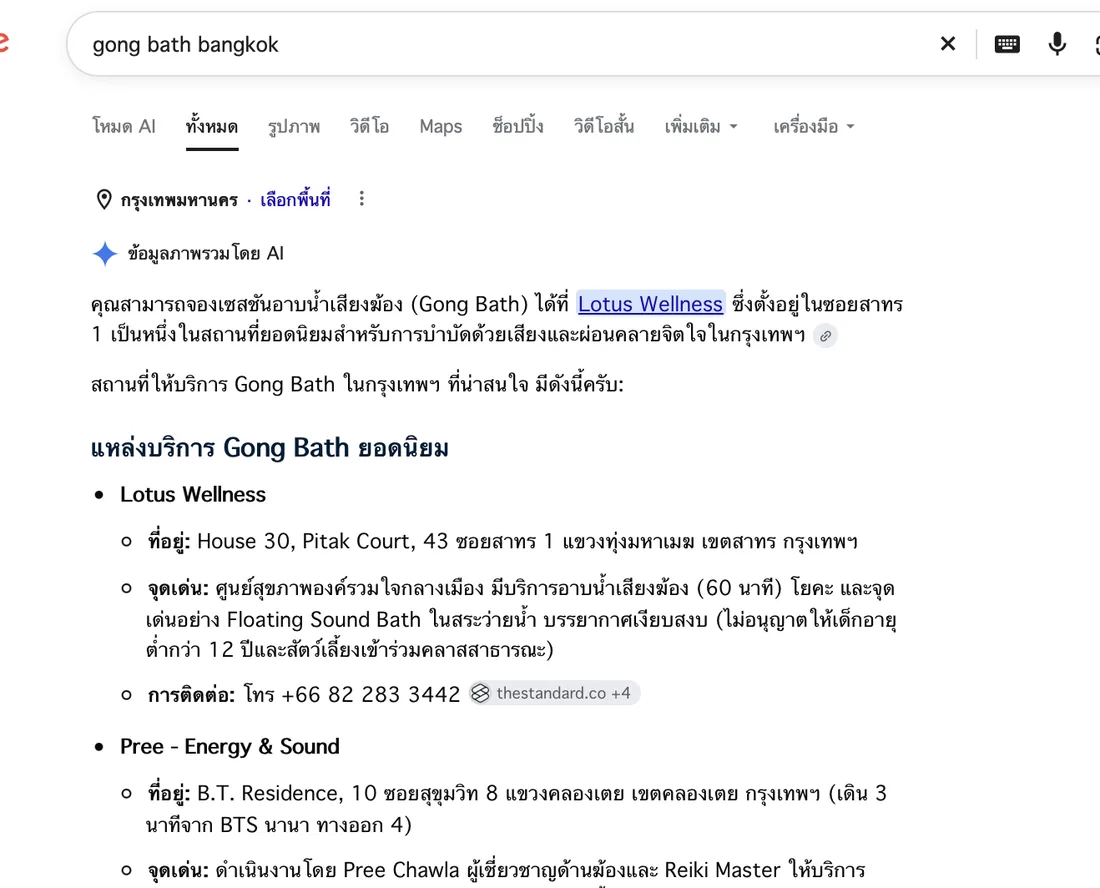
Google's AI Overview names Pree Energy & Sound with its address for the search gong bath bangkok (screenshot taken 3 October 2026). Results can differ by location and time of search.
We hold a 5.0 rating on both Google and Fastwork, from 18 Fastwork jobs with 8 repeat clients, and Al Saray and Brasserie 9 renewed for 6 months after their first 3.
What to do now: a short checklist
- Do not update a live site to the Elementor 4.4 beta; wait for the stable release, and back up before every update
- If you want to try Agent Ready, do it on a staging copy, not the site customers use
- Before limiting which bots can access the site, check you are not blocking the Google or AI search bots you want recommending you
- Check that contact and booking forms use standard widgets and really send
- If you ever turn on a tool that sends data or buys, keep a human confirmation step every time
- Put effort into real page content before llms.txt, because Google does not use that file as a condition for AI Overviews



Want to know how ready your Elementor site is?
Send us your site. We check the version, plugins, forms and bot settings, and show you what to do first, free.
Read how we set up an Elementor backend owners can edit in WordPress with Elementor Pro, and the bigger picture in SEO, AEO, AIO and GEO explained. No one can guarantee Google rankings or AI answers; we show only real, measurable results.