


Short answer: Schema markup is code added to a web page (Google recommends the JSON-LD format) that tells Google and other systems directly what the information on the page is, such as the business name, address, opening hours, prices or who the expert is. Schema does not push rankings directly and does not guarantee a rich result, but it helps business information get read correctly. Daaistudio adds schema that matches the visible page content as part of the website care plus SEO GEO monthly plan.
Schema is a word business owners often see in SEO reports, but few people explain it in plain language. Google Thailand autocomplete (checked 13 October 2026) suggests "schema markup คือ อะไร" (what is schema markup), "schema markup wordpress" and "schema markup html", so people want both the meaning and how to add it. We have not measured the search volume for this term. This article explains what schema is, what it really helps with, what it cannot do, and how we add it to client sites.
What schema markup is, without the jargon
A person reading a page knows at once that "open 10 am to 10 pm" means opening hours, but a search system has to guess from the text. Schema markup puts labels on that information, saying plainly: this is the restaurant's name, this is the address, these are the opening hours, and this person is the chef.
The labels use the standard vocabulary of Schema.org, a project founded by Google, Microsoft, Yahoo and Yandex, so several search engines can read the same language. For the list Google actually uses on its results page, Google recommends its own Search Central documentation, because Schema.org has more types than Google uses.
Examples: what schema can tell Google
| Information on the page | Schema type | Suits |
|---|---|---|
| Business name, logo, contact channels | Organization | Every business |
| Address, opening hours, phone | LocalBusiness (or a subtype such as Restaurant, Dentist) | Shops, clinics and hotels with a location |
| Profile of a chef, doctor or expert | Person | Businesses that sell a person's expertise |
| Articles, publish date, author | Article / BlogPosting | Sites with a blog |
| Page path (Home > Blog > Article) | BreadcrumbList | Sites with several page levels |
| Products, prices, stock | Product | Online shops |
On our own site, every blog article carries BlogPosting, BreadcrumbList and FAQPage schema that matches the FAQ at the end of the article. If you view this page's code, you will find the same questions as the ones below.
JSON-LD, Microdata or RDFa: which to use
Schema can be written in three formats. Google says all three work equally well when written correctly, but recommends JSON-LD because it is the easiest to add and maintain. JSON-LD is one block of code in a script tag, separate from the text people see, so redesigning a page does not break the schema. Microdata and RDFa have to be woven into the HTML tags of the content. We use JSON-LD on every project.
How much schema helps SEO and AI, honestly
This is where many SEO sellers overstate things. Here is the summary from Google's own documents.
- It makes a page eligible for rich results: such as product review stars, prices or recipe details. In a case study Google collected, Rotten Tomatoes added schema to 100,000 pages, and pages with schema had a 25% higher click-through rate than pages without.
- It does not guarantee they show: Google writes that structured data enables a feature to be present, not that it will be present, even if the code passes every test.
- It does not push rankings directly: if schema breaks the rules, Google may apply a manual action, which removes the page's eligibility for rich results but does not affect its ranking in normal web results.
- Google has retired some types: FAQ rich results show only for authoritative government and health sites since August 2023, and in June 2025 Google announced it would stop supporting seven more types, including course info, estimated salary and vehicle listing.
- AI Overviews need no special schema: Google's AI features and your website says there is no special schema to add, but asks that structured data matches the visible text on the page.
In short, schema is not a shortcut. It is basic work that keeps a business's facts clear and consistent, which is what both Google and AI need. For how SEO, AEO and GEO differ, read SEO, AEO, AIO and GEO: the differences.
A real result: Person schema and a chef in an AI Overview
Brasserie 9 is a French restaurant on Sathorn Soi 6 whose SEO and GEO we run monthly. Its strength is Chef Hervé Frérard. We built the chef's profile page only from facts the restaurant confirmed, then added Person schema giving the chef's name, role and the restaurant where he works. Every line of the schema matches the text on the page. When someone asks about the French chef in Bangkok who cooked for Queen Elizabeth, Google's AI Overview answers with the chef's name and our client's restaurant.
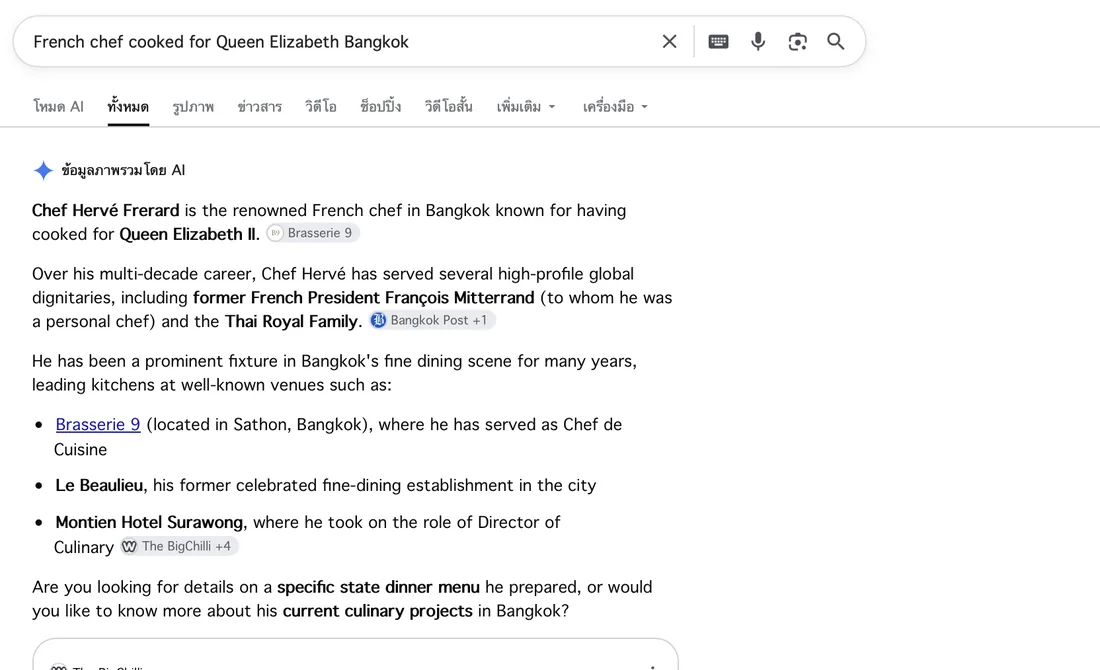
Google's AI Overview answering with the chef and Brasserie 9 information we set up on the page with Person schema (screenshot from the client report, September 2026).
We do not claim schema alone caused this. What worked was clear facts written on one page, with schema confirming the same facts. Read more about this part of our work in our monthly SEO and GEO plan.
How to add schema on a WordPress site
- Set up an SEO plugin: Rank Math or Yoast generates basic schema automatically, such as organization, web page, article and breadcrumb data.
- Fill in business details completely and consistently: name, address, phone and opening hours must match the website and Google Business Profile.
- Add the types that fit the business: for example LocalBusiness for shops and clinics, Person for experts, Product for online shops.
- Test before publishing: Google's Rich Results Test shows which rich results the page is eligible for, and Schema.org's Schema Markup Validator checks all the code.
- Follow up after publishing: Google Search Console reports flag schema errors, for example after a theme change or plugin update.
What we check every time we add schema for a client
- Everything in the schema is visible on the page: schema that states hours or prices not shown on the page breaks Google's guidelines.
- No fake reviews: review stars must come only from real reviews shown on the page.
- No duplicate schema from several plugins: some themes and plugins create their own schema. Without checking, one page can state two conflicting sets of facts.
- The same facts in every language: Thai, English and Japanese pages must carry schema stating the same facts.
- Updates when the business changes: a move, new opening hours or a new expert means updating the page, the schema and Google Business Profile together.
Professionalism clients actually see
We hold a 5.0 rating on both Google and Fastwork, with 18 jobs on Fastwork and 8 clients who hired us again. The restaurants Al Saray and Brasserie 9 renewed their SEO GEO care for 6 months after the first 3. Every month clients get a report built on real data, including schema status and screenshots of search results. You work directly with the founder, and the studio team builds under the founder's direction.



Want to know what the schema on your site tells Google?
Send your site link. We check the schema and the business information Google and AI can read today, and plan the work first, free.
Summary
Schema markup labels information so Google and other systems read a business's facts correctly. Add it as JSON-LD, keep it matched to the visible content, and test it with Google's tools every time. WordPress sites we build have an SEO plugin set up from the start: see WordPress website development. Ongoing schema care is part of the website care plus SEO GEO plan at 8,500 baht a month, first month 4,900 baht. No one can guarantee Google rankings or AI answers. We show only results that really happened and can be measured.
Sources
- Google Search Central: Introduction to structured data markup
- Google Search Central: General structured data guidelines
- Google Search Central: AI features and your website
- Google Search Central Blog: Simplifying the search results page (12 June 2025)
- Google Search Central Blog: Changes to HowTo and FAQ rich results (August 2023)
- Schema.org: About
- Google: Rich Results Test and Schema Markup Validator